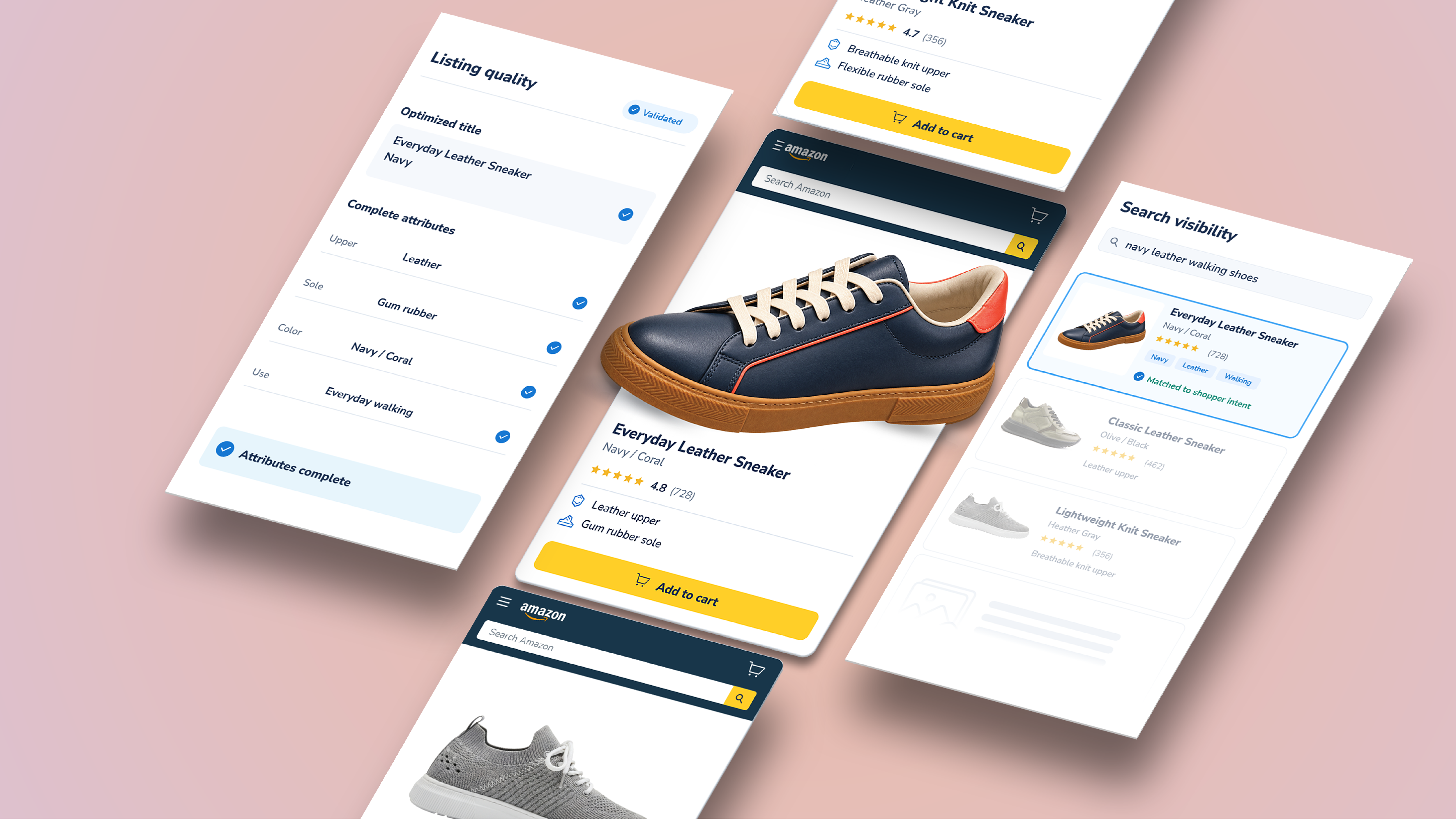





A well-optimized Amazon listing can help a product get discovered. But what happens when you need to maintain that quality across thousands of SKUs, multiple categories, and marketplaces?
For enterprise brands, Amazon product listing optimization involves much more than refining titles, bullet points, and images. It means keeping product information accurate, consistent, and relevant as inventory changes, customer expectations evolve, and Amazon updates its requirements.
And with AI shopping experiences like Alexa for Shopping (formerly Rufus) influencing how customers discover and compare products, detailed, structured product information is becoming even more important.
This guide covers how to improve Amazon product listings for search visibility and conversions, while building processes that make optimization manageable at scale.
How Amazon ranks product listings
Amazon ranking relies on a mix of the classic A9 engine, the updated A10 algorithm, and Alexa for Shopping (based on the COSMO AI model). This entire framework ranks products based on conversion signals, which we will discuss in detail below.
A10 wields greater ranking influence than A9
Historically, Amazon’s A9 algorithm functioned purely as a lexical search engine. It scans your product detail page (PDP) to verify if a shopper’s exact text string appeared in your title or backend search terms.
However, the A10 update changed this dynamic by prioritizing conversion signals and off-Amazon traffic. While keyword relevance, stock availability, FBA, and Prime eligibility remain important, they are no longer enough. Under A10, the engine measures how effectively a product satisfies demand, factoring in your seller authority, which is heavily influenced by your rating and overall account health, to determine your ranking.
Let Productsup handle your Amazon listing optimization
Productsup automates Amazon listing management, ensuring compliance across Seller Central and Vendor Central while reducing errors and scaling workflows.
Learn more →Role of the semantic layer of COSMO AI and Alexa for Shopping
While A10 ranks products based on performance metrics, Amazon’s COSMO AI handles contextual understanding. COSMO is a large-scale ecommerce commonsense knowledge graph, built using large language models (LLMs) to better understand shopper intent and product relationships.
It learns from search-and-purchase and co-purchase behavior to connect products with the needs and situations they serve. COSMO runs in the backend to determine product relevance; Alexa for Shopping serves as the front-end interface that buyers use to chat and discover products.
For example, when a shopper searches for a "quiet vacuum for apartment with pets," COSMO translates that user intent into specific technical requirements, such as low noise levels, space-saving designs, and pet-specific filtration. If your product listing explicitly highlights features like “40 dB operation” or an “integrated HEPA filter,” COSMO can accurately identify and recommend your product to match that buyer's request.
Conversion signals that matter for Amazon listing ranking
Amazon’s algorithm uses conversion signals to rank products. Once a listing is relevant, the algorithm evaluates whether shoppers actually want it, an assessment driven by the following key conversion signals:
- Click-through rate (CTR): A strong CTR suggests that your product is relevant to the search query and compelling enough to attract clicks.
- Conversion rate (CVR): A higher conversion rate indicates that shoppers who visit your listing are more likely to purchase. Amazon refers to this as Unit Session Percentage (units ordered ÷ sessions) in Business Reports.
- Product ratings and reviews: Positive ratings and credible customer reviews build trust and help shoppers make purchase decisions. Amazon also uses return rates and customer feedback as one of the inputs in its ranking and Featured Offer (formerly Buy Box) evaluation.
- Price competitiveness: Pricing influences purchasing decisions and your chances of securing the Featured Offer. Amazon considers competitive pricing, including prices outside its marketplace, when evaluating offers.
- Featured Offer (Buy Box): The Featured Offer is the offer behind the “Add to Cart” and “Buy Now” buttons on a product detail page, so most sales on a multi-seller listing go to the offer that wins it. Amazon selects it based on factors such as competitive pricing, delivery speed, and seller performance. In July 2026, Amazon began removing the separate seller eligibility step, so more offers are now considered. How the winning offer is chosen hasn’t changed, and the rollout is due to finish across all Amazon stores by the end of 2026.
Discover how Thule expanded to 10 new markets in 90 days
Thule uses Productsup’s pre-built channel templates to send product data to Amazon and other channels across 27 markets. In its first three months on the platform, Thule rolled out feeds to 10 new markets covering tens of thousands of products, and it now sets up an export channel for a new market in about an hour.
Read the full case study →Key components of a high-converting Amazon listing that ranks
An effective Amazon listing operates as an integrated product data network. To optimize your ranking, ensure strict compliance with Amazon's requirements for each key field detailed below.
Optimized product title
While Amazon continues to enforce key product title guidelines, across most non-media categories, the overall 200-character title allocation is split across two distinct fields:
- Item name: Up to 75 characters (including spaces)
- Item highlights: Up to 125 characters (including spaces)
Amazon’s AI will automatically rephrase and condense product titles to conform to the 75-character cap. However, automated rewrites can be inaccurate and potentially lead to a loss in traffic. It’s best practice to proactively align your titles with the recommended framework outlined below:
Brand + product type + primary differentiator + essential variant or specification
Here’s an example for an enterprise office-equipment manufacturer:
| Field | Example | Characters |
|---|---|---|
| Item name | Acme ProPrint M450 Wireless Monochrome Laser Printer | 52 |
| Item highlights | Duplex printing, 42 ppm output, Wi-Fi and Ethernet, 550-sheet capacity, compatible with managed print environments | 114 |
Note: This is a guideline, not a fixed template. Prioritize attributes based on product category and buyer intent. Technical specifications may matter more in some categories, while brand or model may take priority in others.
Get your Amazon listings peak-season ready
Peak season can account for 30 to 50% of a retailer’s annual revenue, and it starts in October. Watch our on-demand webinar with Amazon to learn how to optimize your listings, navigate the new EU Expansion Stores, and stay on top of European compliance.
Make the most of bullet points
Amazon describes bullet points as concise statements that highlight key product features and benefits. They help shoppers assess whether a product fits their needs in a consistent, easy-to-scan format.
For most seller listings, Amazon allows up to five bullets (vendors get up to ten in some categories) and requires at least three. Each bullet point should contain 10 to 255 characters, though it can vary based on category templates.
While fields technically accept more characters in some categories, mobile devices truncate bullet points aggressively (often after the first 70-80 characters). So always put your primary keyword and benefit in the first few words.
Amazon has enforced formatting rules for bullets and can remove or rewrite non-compliant ones, so following them protects the copy you’ve optimized. Each bullet should:
- Begin with a capital letter
- Use sentence fragments without end punctuation
- Use semicolons when separating phrases in the same bullet
- Spell out numbers one through nine, except for model names, measurements, and technical specifications
- Add a space between a numeral and a unit, such as “60 ml.”
Amazon also restricts subjective, comparative, or performance claims unless the packaging can verify them. Avoid promotional language such as “best,” “premium,” and restricted claims such as “eco-friendly” or “antibacterial.”
Use such claims only when permitted by Amazon’s policies and supported by appropriate evidence. Avoid guarantees, URLs, contact information, pricing, delivery claims, competitor references, emojis, or placeholder text.

Source
Product descriptions, A+, and Premium A+: Answer remaining questions and improve conversion
Millions of shoppers rely on Alexa for Shopping to complete a purchase, meaning adding linguistic and situational keywords within listings is indispensable. While the product title captures the most critical signals and terms, you can strategically position the remaining key phrases in these additional fields.
- Product description: Use it to close remaining purchase questions that bullets and attributes do not fully address. Include technical specifications, installation requirements, compatibility notes, and operating constraints in short, scannable sentences. Note: For sellers, publishing A+ Content replaces the product description on the detail page. If you use A+, make sure that information also appears in your A+ modules or bullets.
- A+ Content: Create visually appealing A+ modules to demonstrate product use, differentiation, and compatibility at scale. Build a reusable module library tied to product attributes, so updates propagate across ASINs when specifications change. According to Amazon, Basic A+ Content can increase sales by up to 8%.
- Premium A+ Content: You should use Premium A+ on hero SKUs where video and full-width modules can materially improve CVR. Amazon says well-implemented Premium A+ Content can increase sales by up to 20%. To qualify, you need a published Brand Story on all brand-owned ASINs and five approved A+ projects in the last 12 months. You can check your A+ Content Manager for your current status, as Amazon keeps changing eligibility.
Make sure every visual claim matches the catalog data, as inconsistent A+ Content increases support volume and reduces conversion, which weakens ranking signals.

Source
Comply with Amazon product listing image and video guidelines
Amazon prefers a clear main image for accurate product identification with:
- A pure white background (RGB 255,255,255)
- A clearly visible product
- No text or promotional overlays
- A product coverage of at least 85% of the frame
Note: Category-specific rules may differ, so validate every ASIN against its product-type requirements.
For the secondary images, Amazon expects you to showcase the product’s scale reference, application, dimensions, compatibility, installation, and other important information. Lastly, for product video, Amazon accepts .MOV or .MP4 files up to 5 GB and up to 1080p resolution. You can add videos that run from one to 12 minutes in either horizontal 16:9 or vertical 9:16 formats. Remember, each video must be associated with at least one ASIN.
Explore our common Amazon marketplace feed errors guide to ensure you avoid these critical pitfalls!
Backend search terms: Make the most of 250 bytes
Backend search terms are hidden keywords entered in the Search Terms field in Seller Central (generic_keyword in feeds). They help Amazon match an ASIN to relevant searches that the visible listing doesn’t cover.
- Amazon limits this field to only 250 bytes (different from characters), including spaces, so measure the final string by bytes rather than characters.
- Use the limit strategically with relevant synonyms, alternate product names, abbreviations, common spelling variations, and high-intent use cases.
- Never repeat words already used in the brand, title, Item Highlights, bullets, or description.
- Exclude your own brand name, competitor brands, ASINs, promotional claims, temporary phrases, and irrelevant terms.
- Separate terms with single spaces, and avoid commas, semicolons, and other punctuation to save space.
For multilingual catalogs, always count bytes after localization. Accent characters and non-ASCII symbols can consume more than one byte. Keep the field within Amazon’s limit before publishing, then validate indexing through Amazon Brand Analytics and Search Query Performance. Do not treat backend terms as a substitute for complete attributes or clear customer-facing copy.
Role of category, attributes, and structured data
Accurate product types and complete attributes tell Amazon exactly what an ASIN is. Choose the most specific browse node that applies, and fill in every required and recommended attribute for that product type. Wrong classification can trigger invalid fields, keep your product out of search filters, and show your listing to the wrong shoppers.
Attributes such as material, size, color, capacity, compatibility, dimensions, intended use, and certifications give Amazon machine-readable product facts. They also support search refinement and AI-led shopping, where Alexa for Shopping needs clear data to distinguish similar products.
Optimizing Amazon listings for AI-driven shopping with Productsup
AI shopping makes listing optimization more important, not less. Amazon’s AI systems, including COSMO and Alexa for Shopping, need complete and consistent product data to understand what an item does and who it’s for.
Winning those recommendations doesn’t take new tricks. Follow Amazon’s listing rules and describe the product accurately, because missing attributes or contradictory specifications leave too much ambiguity for Amazon to recommend your product.
However, maintaining this standard across tens of thousands of products and multiple international storefronts creates complexity. Manual updates at that scale introduce errors, and AI assistants skip products with conflicting data.
Productsup’s Amazon integration streamlines this process by centralizing enterprise-level product data management and automating feed validation against Amazon’s latest taxonomy requirements. It maintains consistent attribute accuracy across global catalogs without requiring manual intervention.
Productsup validates listings against Amazon’s product-type requirements before submission, shows which products failed and why after each feed, and surfaces products Amazon rejects after go-live. Your team sees every error in one place and fixes it at the source, across every marketplace and both Seller and Vendor Central.
Book a demo to experience how simple governing, scaling, and selling on Amazon becomes with Productsup.
FAQs
Enterprise brands should localize listings per marketplace by researching local keywords, adapting copy to cultural and compliance requirements, and using feed management platforms to synchronize updates. Brands must avoid direct translation and instead optimize source listings first, then create marketplace-specific versions that reflect local search behavior and regulations.
To optimize your Amazon listing for Rufus (now Alexa for Shopping), move away from keyword stuffing and focus on natural, conversational language and context. Alexa for Shopping uses Amazon's COSMO model to map out real-world use cases, meaning it recommends items by understanding context, intent, and problem-solving capabilities rather than matching exact keywords.
To optimize Amazon listings at scale, use bulk data feeds, master content templates, and AI, or use feed management platforms to push standardized, keyword-rich updates across thousands of ASINs via Seller Central Bulk Edits or API integration.
Resolving an Amazon listing error requires locating the specific error code or flagged attribute in Seller Central, then updating the corresponding field with valid, consistent data. For bulk errors, download the Processing Report from your upload status, correct the flagged cells in your source file, ensure paired attributes are complete, and re-upload the file.
About the author